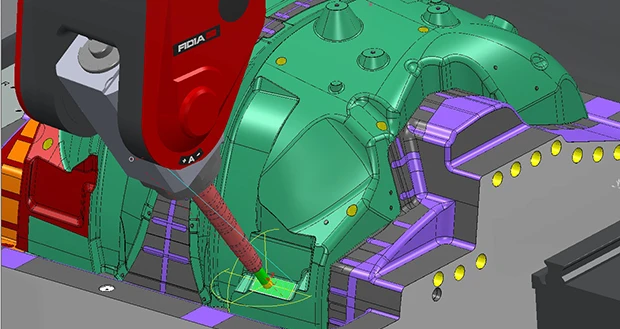
Cleveland, Ohio – The Delcam webinar on Wednesday, May 13, 2015, will show how PowerMILL can undertake complete verification of a project for machine-tool issues such as collisions, rather than having to undertake verification of each individual toolpath in turn. Comprehensive verification is performed, including ensuring that the machine tool is capable of running the proposed strategy, as well as checking for both machine-tool collisions and tooling collisions, during cutting moves and for all leads and links, including machine-tool movements as tool changes are executed. A detailed list is generated of any problems found so that these can be fixed on a case-by-case basis.
As well as highlighting potential collisions, warnings can also be flagged for near misses. The user can specify a clearance value and, when the machine tool comes within this value, it will turn yellow in color to highlight a near miss. The clearance distance is shown in the display.
Also to be demonstrated will be the PowerMILL dialogue to track and adjust the position of the machine tool, and the special toolbar to simulate and adjust the configuration and tool axis of a 3+2 machine or any equipment with incremental rotary axes.
The dialogue presents data on the position of the machine tool, together with the limits set for each axis. It includes a slider to jog the machine components into position during the simulation and displays a warning if any axis limit is exceeded.
The toolbar can be used to edit the tool axis and the orientation of the machine tool. This allows quick and easy updates to existing toolpaths with the new parameters. Warnings appear automatically in the event of machine-tool collisions or axis-limit violations. In addition, a new workplane that is aligned to the new axis and orientation can be created for subsequent programming operations.
The webinar will also show the plug-in for PowerMILL that provides a graph of the linear and rotary axes of the machine during the simulation. Analysis of this graph allows users to locate any potential problems, such as sudden changes in direction or axis reversals that can adversely affect the surface finish. Adjusting the position of the part on the machine and running another simulation will often identify a solution to these problems.
To register, please go to www.powermill.com/webinar/index.asp.
Source: Delcam
Latest from Today's Medical Developments
- Nikon releases latest update to dimensional measurement software
- US cutting tool orders reach $206.1 million in November 2025
- Greenland is a vital link in the global supply chain
- What’s happening in the defense industry right now
- Hypertherm accepting applications for educational grant program
- Making workholding work for you
- Norman Noble offers medical implant engineering design services
- Lubrizol launches new medical-grade TPU material